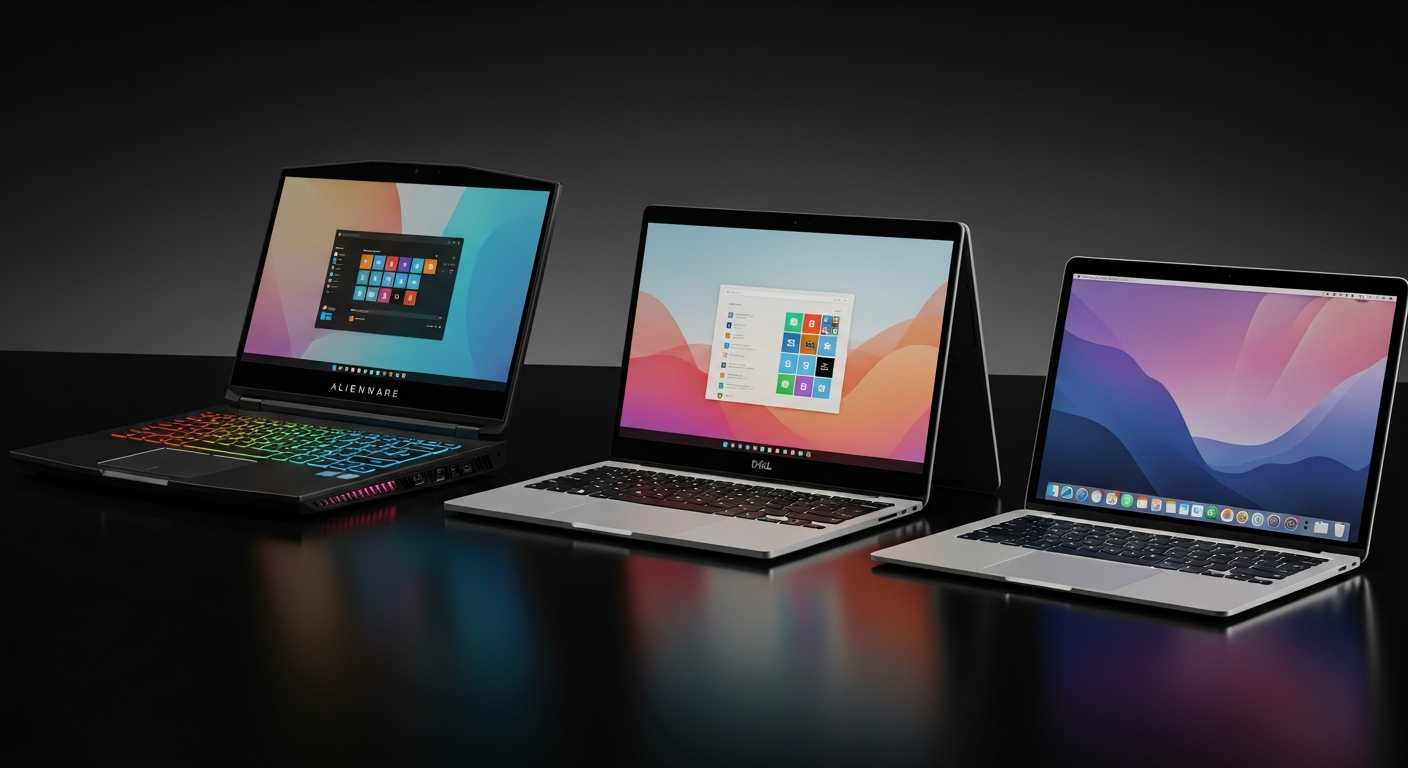
Best Laptops for Gaming in 2026: Alienware vs Dell vs MacBook Air Compared
Looking for the ultimate gaming laptop in 2025? We compare three top contenders — the Alienware 16 Aurora with RTX 5060, the versatile Dell 16 Plus 2-in-1, and the surprisingly capable MacBook Air M4. Find out which laptop dominates for your play style and budget.
Best Laptops for Gaming in 2026: Alienware vs Dell vs MacBook Air Compared
By Bill Gatos | Gaming Hardware | February 2026
---
Table of Contents
- 1.Introduction
- 2.Why Your Laptop Choice Matters for Gaming
- 3.Alienware 16 Aurora: The Powerhouse
- 4.Dell 16 Plus 2-in-1: The Versatile Workhorse
- 5.MacBook Air M4: The Sleeper Pick
- 6.Head-to-Head Comparison
- 7.Which Laptop Is Right for You?
- 8.Recommended Gear
- 9.FAQ
---
Introduction
The laptop gaming landscape has never been more exciting — or more confusing. With NVIDIA's RTX 50-series GPUs hitting the market, Intel and AMD battling it out on the CPU front, and Apple's M4 chip proving that macOS can actually game, 2026 is a watershed year for portable gaming rigs.
But here's the question every gamer is asking: which laptop actually delivers the best experience for the money?
Today, we're putting three radically different laptops head-to-head. The Alienware 16 Aurora is a no-compromise gaming beast with the brand-new RTX 5060. The Dell 16 Plus 2-in-1 is a productivity-first machine with a touchscreen that moonlights as a capable gaming rig. And the MacBook Air M4 — yeah, you read that right — is Apple's ultra-portable that has quietly become a legitimate casual gaming platform thanks to the M4's GPU improvements and the growing Apple Arcade and Steam library.
Let's break them down, spec by spec, game by game, dollar by dollar.
---
Why Your Laptop Choice Matters for Gaming
Before we dive into the hardware, let's talk about why this decision is so critical in 2026. The gaming industry has shifted dramatically:
- Browser games and indie titles run on virtually anything, meaning even budget laptops can handle platforms like Windous95 and its 120+ game library
- AAA titles like Cyberpunk 2077, Alan Wake 2, and Black Myth Wukong demand serious GPU horsepower
- Ray tracing and DLSS 4 are no longer optional — they're expected in modern games
- AI-powered features like NVIDIA ACE and AMD FSR 4 require dedicated neural processing hardware
- Battery life matters more than ever as gaming goes mobile-first
The right laptop isn't just about raw specs anymore. It's about finding the sweet spot between performance, portability, display quality, and value. And that sweet spot is different for every gamer.
---
Alienware 16 Aurora: The Powerhouse
Alienware 16 Aurora Gaming Laptop ↗ — *The one for serious gamers who refuse to compromise.*
Key Specs
| Spec | Details |
|---|---|
| Display | 16-inch 16:10 WQXGA (2560x1600) |
| Processor | Intel Core 7 240H Series 2 |
| GPU | NVIDIA GeForce RTX 5060 8GB GDDR7 |
| RAM | 16GB DDR5 |
| Storage | 1TB SSD |
| OS | Windows 11 Home |
| Extras | Onsite Service included |
Why Gamers Love It
The Alienware 16 Aurora is built from the ground up for one thing: gaming performance. The RTX 5060 with 8GB of next-gen GDDR7 memory is a massive leap over the previous generation. We're talking about a GPU that can handle Cyberpunk 2077 at high settings with ray tracing enabled at playable frame rates — on a laptop.
The 16:10 WQXGA display is a game-changer (pun intended). That extra vertical screen real estate compared to traditional 16:9 panels means more immersion in open-world titles and better visibility in competitive shooters. Colors are vibrant, contrast is deep, and the response time is snappy enough for fast-paced FPS action.
Intel's Core 7 240H Series 2 processor pairs beautifully with the RTX 5060. The hybrid architecture with performance and efficiency cores means you get explosive multi-threaded performance when gaming while sipping battery when you're just browsing or doing light work.
Who Should Buy This
- Competitive gamers who need maximum frame rates
- Content creators who also game (the RTX 5060 accelerates video editing and 3D rendering)
- Anyone who wants the latest GPU technology without waiting for desktop availability
- LAN party enthusiasts who need desktop-class performance in a portable package
The Alienware brand also carries serious credibility in the gaming community. When you pull this out at a tournament or gaming cafe, people notice.
Check Current Price on Amazon → ↗
---
Dell 16 Plus 2-in-1: The Versatile Workhorse
Dell 16 Plus 2-in-1 Laptop ↗ — *The smart pick for gamers who also need a real productivity machine.*
Key Specs
| Spec | Details |
|---|---|
| Display | 16-inch 1920x1200 Touchscreen |
| Processor | Intel Core Ultra 5 226V (AI-ready) |
| GPU | Integrated Intel Arc Graphics |
| RAM | 16GB DDR5 |
| Storage | 1TB SSD |
| OS | Windows 11 Home |
| Form Factor | 2-in-1 Convertible with Touchscreen |
| Extras | Copilot PC, Wi-Fi 7, Backlit Keyboard, 1080p Webcam |
Why It's a Hidden Gem
Here's the thing most gaming publications won't tell you: you don't always need a dedicated GPU to game. The Dell 16 Plus 2-in-1 runs on Intel's Core Ultra 5 226V processor, which is part of the new "AI-ready" Copilot PC platform. And that integrated Intel Arc GPU? It's genuinely capable.
For browser-based gaming — think the entire Windous95 library with 120+ titles, Steam indie games, retro emulation, and even some lighter AAA titles — this machine handles it all smoothly. The touchscreen adds a whole new dimension to certain game genres. Imagine playing tower defense, puzzle games, or strategy titles with direct touch input. It's surprisingly natural.
The 2-in-1 form factor means you can flip it into tablet mode for casual gaming sessions, tent it for Netflix, or use it as a traditional laptop for work. Wi-Fi 7 ensures the lowest possible latency for online gaming, which is a feature most budget gaming laptops still lack.
The "AI-ready" Copilot integration is also worth mentioning. While it's primarily a productivity feature, AI-assisted game optimization, automatic settings tuning, and smart resource allocation are becoming real things in 2026.
Who Should Buy This
- Students and professionals who game casually but need a serious work machine
- Browser gaming enthusiasts who play on platforms like Windous95
- Touch-screen gaming fans who enjoy mobile-style games on a big screen
- Budget-conscious buyers who want one laptop for everything
- Frequent travelers who need lighter weight without sacrificing screen size
The Dell 16 Plus 2-in-1 won't run Cyberpunk at ultra settings, but it'll handle 90% of what most people actually play — and it'll do everything else better than any gaming laptop.
Check Current Price on Amazon → ↗
---
MacBook Air M4: The Sleeper Pick
Apple MacBook Air 13-inch M4 ↗ — *The laptop nobody expected to be a gaming contender.*
Key Specs
| Spec | Details |
|---|---|
| Display | 13.6-inch Liquid Retina (2560x1664) |
| Processor | Apple M4 chip |
| GPU | Integrated 10-core GPU |
| RAM | Unified Memory (configurable) |
| Storage | SSD (configurable) |
| OS | macOS with Apple Intelligence |
| Battery | All-Day Battery Life (18+ hours) |
| Extras | Apple Intelligence, Fanless Design |
The Mac Gaming Revolution Is Real
Look, we get it. "Mac gaming" has been a punchline for decades. But the M4 chip has genuinely changed the equation, and if you're not paying attention, you're missing out.
The M4's 10-core GPU is significantly more powerful than any integrated graphics from Intel or AMD. It handles Metal-optimized games with surprising grace. Titles like Resident Evil Village, No Man's Sky, Baldur's Gate 3, and Lies of P all run natively on Apple Silicon now. The Steam library for macOS has expanded dramatically, and with Apple's Game Porting Toolkit 2, even more Windows games are becoming playable.
But here's where the MacBook Air M4 truly shines for gaming: battery life. With 18+ hours of use, you can game for hours without ever plugging in. Try doing that with any Windows gaming laptop. The Alienware? You'll get maybe 3-4 hours under gaming load. The MacBook Air just keeps going.
The Liquid Retina display is also spectacular. At 2560x1664, it's pixel-dense enough that games look razor-sharp, and the P3 wide color gamut means colors pop in a way that most gaming laptop displays can't match.
And the fanless design means zero noise. Absolutely silent gaming. If you've ever been annoyed by laptop fans spinning up during intense gaming sessions, the MacBook Air eliminates that entirely.
For browser gaming, the MacBook Air M4 is arguably the best option on this list. Safari and Chrome both deliver excellent performance for web-based games, and the M4's GPU acceleration makes WebGL and WebGPU content buttery smooth. Playing the entire Windous95 game library on a MacBook Air? It's genuinely delightful.
Who Should Buy This
- Apple ecosystem users who want to game without a second device
- Casual and indie gamers who prioritize the growing Mac game library
- Browser gaming fans who want the best web performance
- Battery life obsessives who game on the go
- Anyone who values silence — zero fan noise, ever
- Creative professionals who also game (Final Cut Pro + gaming on one device)
Check Current Price on Amazon → ↗
---
Head-to-Head Comparison
Let's put all three laptops side by side and see how they stack up across the categories that matter most to gamers.
Performance Comparison Table
| Category | Alienware 16 Aurora | Dell 16 Plus 2-in-1 | MacBook Air M4 |
|---|---|---|---|
| AAA Gaming | ★★★★★ | ★★☆☆☆ | ★★★☆☆ |
| Browser Gaming | ★★★★★ | ★★★★☆ | ★★★★★ |
| Indie/Casual | ★★★★★ | ★★★★☆ | ★★★★★ |
| Ray Tracing | ★★★★★ | ☆☆☆☆☆ | ★★☆☆☆ |
| Battery Life | ★★☆☆☆ | ★★★★☆ | ★★★★★ |
| Display Quality | ★★★★★ | ★★★★☆ | ★★★★★ |
| Portability | ★★★☆☆ | ★★★★☆ | ★★★★★ |
| Productivity | ★★★☆☆ | ★★★★★ | ★★★★★ |
| Build Quality | ★★★★★ | ★★★★☆ | ★★★★★ |
| Value | ★★★★☆ | ★★★★★ | ★★★★☆ |
Benchmark Estimates (Based on GPU Tier)
| Game | Alienware (RTX 5060) | Dell (Intel Arc iGPU) | MacBook Air (M4 GPU) |
|---|---|---|---|
| Cyberpunk 2077 (High) | ~70 FPS | ~20 FPS | ~35 FPS |
| Fortnite (High) | ~144 FPS | ~60 FPS | ~80 FPS |
| Minecraft (Shaders) | ~120 FPS | ~45 FPS | ~60 FPS |
| Browser Games (Windous95) | 60 FPS (locked) | 60 FPS (locked) | 60 FPS (locked) |
| Baldur's Gate 3 (Medium) | ~90 FPS | ~25 FPS | ~45 FPS |
| CS2 (Medium) | ~200 FPS | ~70 FPS | ~90 FPS |
The Verdict by Use Case
For maximum gaming performance: The Alienware 16 Aurora ↗ wins handily. The RTX 5060 is in a completely different league. If you play AAA titles at high settings, this is your laptop.
For the best all-rounder: The Dell 16 Plus 2-in-1 ↗ delivers the most versatility per dollar. Touchscreen, 2-in-1 form factor, Wi-Fi 7, AI features — it does everything well.
For portability and battery life: The MacBook Air M4 ↗ is unmatched. Silent, all-day battery, gorgeous display, and surprisingly capable gaming performance.
---
Which Laptop Is Right for You?
Still can't decide? Here's a quick decision tree:
Do you play AAA games at high/ultra settings? → Yes → Alienware 16 Aurora ↗ → No → Keep reading
Do you need a laptop for work AND gaming? → Yes, and I'm on Windows → Dell 16 Plus 2-in-1 ↗ → Yes, and I'm in the Apple ecosystem → MacBook Air M4 ↗
Is battery life your top priority? → Yes → MacBook Air M4 ↗ (18+ hours is unbeatable)
Do you primarily play browser games and indie titles? → Yes → Any of these three will work great, but the Dell 16 Plus ↗ offers the best value
---
Recommended Gear
No matter which laptop you choose, these accessories will level up your gaming experience:
- Alienware 16 Aurora with RTX 5060 ↗ — The ultimate gaming laptop for serious players
- Dell 16 Plus 2-in-1 ↗ — Best all-around laptop for work and play
- MacBook Air M4 ↗ — The silent, all-day battery gaming sleeper
- Shop Gaming Laptops on Amazon → ↗
- Browse Trending Electronics → ↗
- Best Selling Gaming PCs → ↗
---
FAQ
Is the Alienware 16 Aurora worth the premium price?
Absolutely, if gaming performance is your top priority. The RTX 5060 with 8GB GDDR7 delivers performance that's close to desktop-class GPUs. You're paying for cutting-edge technology, premium build quality, and the Alienware brand reputation. For serious gamers, it's money well spent.
Can the Dell 16 Plus 2-in-1 actually run games?
Yes! While it won't handle the latest AAA titles at ultra settings, Intel's integrated Arc graphics are surprisingly capable. Browser games, indie titles, older AAA games, and even some modern games at lower settings run well. It's perfect for casual gamers who also need a productivity machine.
Is the MacBook Air M4 really good for gaming?
It's genuinely surprising how capable it is. The M4's 10-core GPU handles Metal-optimized games impressively, and the Steam library for macOS has grown significantly. For browser gaming, indie titles, and Apple Arcade, it's excellent. It won't replace a dedicated gaming rig for AAA titles, but it's far more capable than most people expect.
Which laptop has the best display for gaming?
The Alienware and MacBook Air are both excellent. The Alienware's WQXGA panel offers great color accuracy and response times suited for competitive gaming. The MacBook Air's Liquid Retina display has the highest pixel density and best color accuracy. The Dell's touchscreen adds versatility but has a lower resolution.
How important is dedicated GPU memory (VRAM) for gaming in 2026?
Very important for AAA gaming. The Alienware's 8GB GDDR7 VRAM ensures smooth performance at high resolutions with detailed textures. Games are using more VRAM than ever, especially with ray tracing enabled. For browser and casual gaming, integrated graphics are sufficient.
Can I upgrade the RAM or storage on these laptops?
The Dell 16 Plus typically allows SSD upgrades. The Alienware may allow RAM and SSD upgrades depending on the specific configuration. The MacBook Air M4 is not user-upgradeable — you need to configure it at purchase. Always buy the specs you'll need long-term with the MacBook.
Which laptop is best for streaming while gaming?
The Alienware 16 Aurora, hands down. The RTX 5060 has a dedicated hardware encoder (NVENC) that handles streaming with minimal performance impact. The Dell and MacBook can stream lighter games but will struggle with demanding titles.
Do any of these laptops support external GPU (eGPU)?
The Dell 16 Plus and MacBook Air M4 both support Thunderbolt connections that can theoretically drive an eGPU, though macOS support is limited. The Alienware doesn't really need one — its built-in RTX 5060 is already powerful enough for most gaming scenarios.
What's the best laptop for playing games on Windous95?
All three handle browser-based gaming beautifully. Windous95's 120+ game library runs at a smooth 60 FPS on any of these machines. If you're primarily a browser gamer, the Dell 16 Plus offers the best value, while the MacBook Air offers the best battery life for extended sessions.
Should I wait for next-generation laptops or buy now?
The RTX 5060 in the Alienware is already next-gen — it just launched. The M4 MacBook Air is Apple's latest silicon. And the Dell 16 Plus with Core Ultra represents Intel's newest platform. All three are current-generation machines, so there's no reason to wait. Buy now and start gaming!
---
*Bill Gatos is the lead gaming journalist at Windous95 Gaming Magazine. When he's not benchmarking the latest hardware, he's playing Minesweeper on his collection of vintage PCs. Follow the magazine for daily gaming news, reviews, and guides.*
---
Ready to upgrade your gaming setup? Check out the laptops featured in this article: